
We’ve officially upgraded ConsentBit with enhanced support for the latest IAB Transparency & Consent Framework (TCF) standards

LABOR DAY SALE

20% OFF
Coupon code : LABOR20


The EU’s data protection law requires clear, opt-in consent before a website sets non-essential cookies or runs tracking scripts. ConsentBit asks every visitor, blocks what they haven’t allowed, and keeps the proof.
Banner available in 9 languages · Works on Webflow, Framer, WordPress and any website builder
Non-essential cookies stay blocked until the visitor opts in.
Every choice is logged, and can be changed or withdrawn at any time.
GDPR is the EU’s data protection law. It applies to businesses anywhere that offer services to, or track the behaviour of, people in the EU and EEA. The UK has its own version, UK GDPR.
Maximum fine
€20 million or 4%
of global annual revenue, whichever is higher.
In effect since
25 May 2018
Default model
Opt-in: non-essential cookies stay off until a visitor agrees.
Each requirement in plain terms, next to how ConsentBit covers it.
What GDPR requires
Get consent before collecting data
How ConsentBit handles it
Non-essential cookies and scripts stay blocked until the visitor opts in.
What GDPR requires
Make rejecting as easy as accepting
How ConsentBit handles it
Reject all sits right next to Accept all, at the same size and weight.
What GDPR requires
Let people change or withdraw consent
How ConsentBit handles it
A floating icon on every page reopens their settings at any time.
What GDPR requires
Keep proof of consent
How ConsentBit handles it
Each choice is logged with when it was made and which categories were accepted or rejected.
What GDPR requires
Be transparent about how data is used
How ConsentBit handles it
Each cookie category is explained in the banner, which is available in 9 languages.
The banner appears the moment someone lands. From there, the visitor stays in control of what runs.
The banner appears straight away. Until they choose, only necessary cookies run.
Accept all, Reject all, or open Preferences to pick specific categories.
Accepted categories switch on. Everything else stays blocked.
The floating icon reopens their settings. Withdrawn categories are blocked again.
Necessary cookies keep the site working, so they’re always on. Preferences, Analytics and Marketing stay off until the visitor switches them on.
Keeps the site working, for example login, shopping cart and security. Can’t be switched off.
Remembers settings such as language, region or theme.
Measures how visitors use the site so you can improve it, for example Google Analytics.
Tracks behaviour to show personalised ads and offers, for example Meta Pixel or Google Ads.
ConsentBit uses an opt-in model. Here’s what runs on a first visit, and what changes when a visitor accepts Analytics only.
If the page loads a script after a click, ConsentBit holds it until the visitor has given consent.
If a visitor turns a category off from the floating icon, those scripts are blocked again.
Using Google tags as well? Each category is passed on as a Google Consent Mode signal. See how Consent Mode V2 works →
Four steps, from a new account to a setup you can verify yourself.
Add your site in the ConsentBit dashboard and copy your Script ID.
Add the ConsentBit script as the first script in your <head>, above your Google tags. Or add the ConsentBit CMP template in Google Tag Manager, on the Consent Initialization trigger.
Advanced is the default: Google tags load with consent set to denied. In Basic mode, Google tags don’t load at all until the visitor agrees.
Apply the Google Consent Mode banner template, then open your site with ?consentbit_debug=1 to confirm the consent default loads before your Google tags.
Add a GDPR banner to your site, free.
Start free trial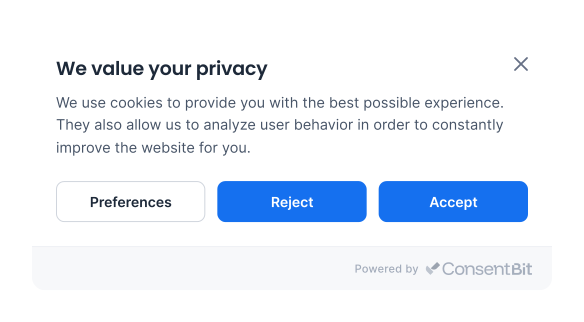
Short answers to what website owners ask most.
It applies to businesses anywhere that offer goods or services to people in the EU and EEA, or track their behaviour. Where your company is based doesn't matter: what matters is whose data you process. The UK has its own version, UK GDPR, with the same standard for valid consent.
You need a way to get consent before non-essential cookies and tracking scripts run, and a way for visitors to withdraw it later. A banner is the usual way to do both. Cookies that are strictly necessary for the site to work don't need consent.
Consent has to be freely given, specific, informed and unambiguous, which means an active choice. Pre-ticked boxes, cookie walls that leave no real option, and banners where accepting is far easier than rejecting don't meet that standard.
Up to €20 million or 4% of global annual revenue, whichever is higher. Cookie consent cases are often brought by national data protection authorities, and a warning or order to fix the banner is a common first step.
No. If a visitor rejects a category, those cookies and scripts must stay blocked. ConsentBit blocks them before they load, including scripts that are added to the page later.
GDPR is opt-in: non-essential cookies stay off until a visitor agrees. CCPA is opt-out: collection can start by default as long as visitors are told and can stop the sale or sharing of their data. With geo-targeting, ConsentBit can show each visitor the right banner.
If you use Google Ads or Google Analytics, yes. Consent Mode passes the choice a visitor makes in your banner to Google's tags. ConsentBit collects the consent and sends the signals.
Yes. ConsentBit has a free plan, and every paid plan comes with a 14-day free trial. See pricing for what each plan includes.
Block non-essential scripts until visitors agree, give them an easy way to change their mind, and keep a record of every choice.
This page is a general overview of GDPR, not legal advice. Cookie consent rules come from the EU ePrivacy Directive, which uses the GDPR standard for valid consent.