



GDPR
Under GDPR, tracking waits for a yes.
The EU’s data protection law requires clear, opt-in consent before a website sets non-essential cookies or runs tracking scripts. ConsentBit asks every visitor, blocks what they haven’t allowed, and keeps the proof.
Banner available in 9 languages · Works on Webflow, Framer, WordPress and any website builder
First visit to your site
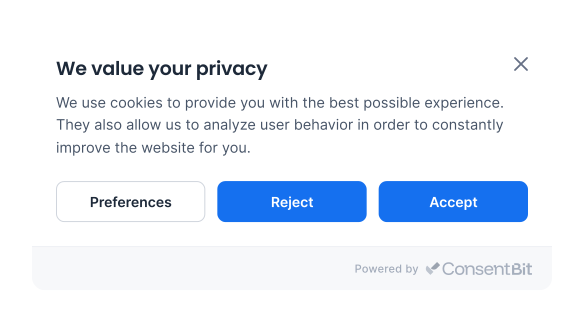
We value your privacy
We use necessary cookies to run this site. With your permission, we’d also like to measure traffic and show relevant ads.
Until they choose, only necessary cookies run. The floating icon reopens their settings any time.
Non-essential cookies stay blocked until the visitor opts in.
Every choice is logged, and can be changed or withdrawn at any time.
One of the world’s strictest privacy laws, with fines to match.
GDPR is the EU’s data protection law. It applies to businesses anywhere that offer services to, or track the behaviour of, people in the EU and EEA. The UK has its own version, UK GDPR.
Maximum fine
€20 million or 4%
of global annual revenue, whichever is higher.
In effect since
25 May 2018
Default model
Opt-in: non-essential cookies stay off until a visitor agrees.
Five things GDPR expects from your website
Each requirement in plain terms, next to how ConsentBit covers it.
What GDPR requires
Get consent before collecting data
How ConsentBit handles it
Non-essential cookies and scripts stay blocked until the visitor opts in.
What GDPR requires
Make rejecting as easy as accepting
How ConsentBit handles it
Reject all sits right next to Accept all, at the same size and weight.
What GDPR requires
Let people change or withdraw consent
How ConsentBit handles it
A floating icon on every page reopens their settings at any time.
What GDPR requires
Keep proof of consent
How ConsentBit handles it
Each choice is logged with when it was made and which categories were accepted or rejected.
What GDPR requires
Be transparent about how data is used
How ConsentBit handles it
Each cookie category is explained in the banner, which is available in 9 languages.
What a visitor sees, step by step
The banner appears the moment someone lands. From there, the visitor stays in control of what runs.
They land on your site
The banner appears straight away. Until they choose, only necessary cookies run.
They make a choice
Accept all, Reject all, or open Preferences to pick specific categories.
Only what they allow runs
Accepted categories switch on. Everything else stays blocked.
They can change their mind
The floating icon reopens their settings. Withdrawn categories are blocked again.
Four cookie categories. Only one starts on.
Necessary cookies keep the site working, so they’re always on. Preferences, Analytics and Marketing stay off until the visitor switches them on.
Cookie preferences
Blocked until allowed
ConsentBit uses an opt-in model. Here’s what runs on a first visit, and what changes when a visitor accepts Analytics only.
Scripts added later are caught too
If the page loads a script after a click, ConsentBit holds it until the visitor has given consent.
Consent can be withdrawn
If a visitor turns a category off from the floating icon, those scripts are blocked again.
Using Google tags as well? Each category is passed on as a Google Consent Mode signal. See how Consent Mode V2 works →
Add a GDPR banner to your site, free.
FAQ
GDPR questions, answered
Short answers to what website owners ask most.
It can. GDPR applies to businesses outside the EU when they offer goods or services to people in the EU or EEA, or monitor their behavior there, for example by tracking visitors for targeted ads. Where the business is based doesn't change that.
Yes. GDPR has no minimum company size or revenue. Organizations with fewer than 250 employees are excused from some record-keeping in limited cases, but the consent rules for cookies apply to businesses of every size.
If your site uses cookies or trackers that aren't strictly necessary, such as analytics or ad pixels, you need visitors' consent before they run. The law doesn't require a banner specifically, but a banner is the most common way to ask. Cookies that are strictly necessary for the site to work, such as a shopping cart, don't need consent.
In most cases, yes. Google Analytics uses cookies to measure how people use your site, and EU regulators generally treat those cookies as non-essential, so they need consent first. If you use Google Ads or Google Analytics with visitors in the EEA or the UK, Google also expects you to pass their consent choices through Consent Mode V2. ConsentBit supports Consent Mode V2.
(Link: "How Google Consent Mode V2 works" → https://www.consentbit.com/blog/google-consent-mode-v2)
GDPR doesn't set a fixed expiry. Regulators give guidance instead: France's CNIL, for example, recommends keeping a visitor's choice for about 6 months before asking again. You should also ask again when something changes, such as adding a new cookie or using data for a new purpose.
(Link: "When should you re-ask for cookie consent?" → https://www.consentbit.com/blog/when-should-you-re-ask-for-cookie-consent-consent-expiry-explained)
GDPR is opt-in: non-essential cookies stay off until a visitor agrees. CCPA, California's privacy law, is opt-out: data collection can start by default as long as visitors are told about it, but they must be able to stop the sale or sharing of their personal information. A Global Privacy Control signal from their browser counts as an opt-out. With geo-targeting, ConsentBit can show a CCPA banner to US visitors and a GDPR banner to everyone else.
(Link "Read our CCPA guide" once the CCPA page is live)
No. A banner handles consent for cookies and trackers. GDPR also covers the other personal data you collect, for example through contact forms, newsletters and customer accounts. You need a legal basis for each use, a clear privacy policy, and a process for people who ask to see or delete their data. ConsentBit covers cookie consent, and our free privacy policy generator can help you draft the policy.
(Link: "free privacy policy generator" → https://www.consentbit.com/privacy-policy-generator)
Yes. ConsentBit has a free plan, and every paid plan comes with a 14-day free trial. See pricing for what each plan includes.
(Link: "See pricing")
Does GDPR apply to US businesses?
It can. GDPR applies to businesses outside the EU when they offer goods or services to people in the EU or EEA, or monitor their behavior there, for example by tracking visitors for targeted ads. Where the business is based doesn't change that.
Does GDPR apply to small businesses?
Yes. GDPR has no minimum company size or revenue. Organizations with fewer than 250 employees are excused from some record-keeping in limited cases, but the consent rules for cookies apply to businesses of every size.
Do I need a cookie banner under GDPR?
If your site uses cookies or trackers that aren't strictly necessary, such as analytics or ad pixels, you need visitors' consent before they run. The law doesn't require a banner specifically, but a banner is the most common way to ask. Cookies that are strictly necessary for the site to work, such as a shopping cart, don't need consent.
Does Google Analytics need cookie consent under GDPR?
In most cases, yes. Google Analytics uses cookies to measure how people use your site, and EU regulators generally treat those cookies as non-essential, so they need consent first. If you use Google Ads or Google Analytics with visitors in the EEA or the UK, Google also expects you to pass their consent choices through Consent Mode V2. ConsentBit supports Consent Mode V2.
(Link: "How Google Consent Mode V2 works" → https://www.consentbit.com/blog/google-consent-mode-v2)
How long does cookie consent last under GDPR?
GDPR doesn't set a fixed expiry. Regulators give guidance instead: France's CNIL, for example, recommends keeping a visitor's choice for about 6 months before asking again. You should also ask again when something changes, such as adding a new cookie or using data for a new purpose.
(Link: "When should you re-ask for cookie consent?" → https://www.consentbit.com/blog/when-should-you-re-ask-for-cookie-consent-consent-expiry-explained)
What's the difference between GDPR and CCPA?
GDPR is opt-in: non-essential cookies stay off until a visitor agrees. CCPA, California's privacy law, is opt-out: data collection can start by default as long as visitors are told about it, but they must be able to stop the sale or sharing of their personal information. A Global Privacy Control signal from their browser counts as an opt-out. With geo-targeting, ConsentBit can show a CCPA banner to US visitors and a GDPR banner to everyone else.
(Link "Read our CCPA guide" once the CCPA page is live)
Is a cookie banner enough to comply with GDPR?
No. A banner handles consent for cookies and trackers. GDPR also covers the other personal data you collect, for example through contact forms, newsletters and customer accounts. You need a legal basis for each use, a clear privacy policy, and a process for people who ask to see or delete their data. ConsentBit covers cookie consent, and our free privacy policy generator can help you draft the policy.
(Link: "free privacy policy generator" → https://www.consentbit.com/privacy-policy-generator)
Is there a free trial?
Yes. ConsentBit has a free plan, and every paid plan comes with a 14-day free trial. See pricing for what each plan includes.
(Link: "See pricing")
Related reading
Get consent right on your website
Block non-essential scripts until visitors agree, give them an easy way to change their mind, and keep a record of every choice.