

Do Shopify Stores Need a Cookie Banner? Yes, and the Free One Covers Less Than You Think
Shopify gives you a cookie banner in your privacy settings. It governs the tracking Shopify manages. The Meta Pixel you added for ads, the TikTok tag, the review app, the upsell app and the chat widget are a different question.
ConsentBit is a Google-certified CMP. Scan your store, block what should be blocked, keep the record that proves it.
Consent, Done Better.
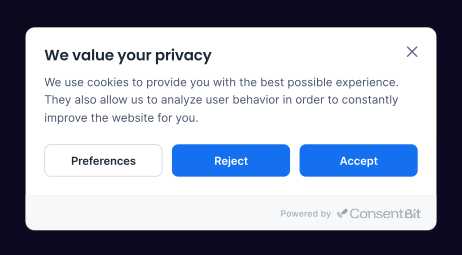
A banner is not consent
A banner announces cookies. Consent means nothing non-essential runs until the shopper agrees.
On a Shopify store that distinction costs money in both directions. Fire your pixels too early and you have a compliance problem. Block them clumsily and your ad measurement goes dark. The goal is neither: it is blocking until consent, then passing the shopper’s choice to your ad platforms so measurement keeps working.
What Shopify's built-in banner covers, and what it does not
Shopify's own help centre puts it plainly: "If you have manually installed third-party cookies or pixels or integrated them through apps on your store, then you may need to use a third-party cookie banner or add custom logic to ensure they are honoring customer consent."
Shopify routes consent through its Customer Privacy API. Anything that reads that API behaves. Anything pasted into your theme, or added by an app that does not use it, carries on regardless. That is the gap, and Shopify is the one telling you about it.
Shopify capabilities checked on 23 November 2026 against the Shopify Help Center, Configuring customer privacy settings and Understanding customer privacy settings.
Four questions that decide it
How to add cookie consent to a Shopify store
Scan your store.
Add your domain and ConsentBit returns every cookie and tracker found, including the ones your apps brought with them.
Add the script.
In Shopify, go to Online Store → Themes → Edit code, open layout/theme.liquid, paste the ConsentBit script before the closing </head> tag, and save.
Set your rules and publish.
Choose your categories, style the banner to match your store, set your regions, publish. Non-essential scripts stay silent until a shopper agrees.
Then turn off the Shopify banner, and set the consent regions in Shopify's Customer privacy settings to match the regions where ConsentBit shows its banner. Shopify warns that if these do not match, non-essential data can be processed before a visitor gives consent.
How to check your store actually blocks cookies
Do not trust the banner. Test it. Two minutes.
Illustration of the test result. Cookie names are the examples from step 3.
Found pixels firing early?
Run a free scan and see every tracker on your store in under a minute.
What changes once ConsentBit is on
Nothing tracks before it should.
Pixels, analytics, chat and review apps stay off until the shopper chooses.
Your ad measurement survives a Reject.
Google Consent Mode v2 is included on every plan, so your tags still receive signals instead of going silent.
Proof, not promises.
Every consent is logged with its timestamp and choices, and exports as CSV or JSON.
Looks like your store, not like a legal notice.
Full design control on every paid plan.
- Free · 1 domain, 5,000 pageviews
- Basic $9 · per domain, per month
- Essential $20 · adds IAB TCF
- Growth $56 · adds geo rules and white label
Annual billing saves 12.5% to 33%. 14 day trial, no card required.
ConsentBit for Shopify at a glance
Built for how stores actually run
Stores running paid ads.
The more pixels you run, the more exposure you carry, and the more you need consent signals rather than silence after a Reject.
Stores with a long app list.
Every app can add a tracker. Automatic scanning catches the ones installed last month.
Agencies managing multiple stores.
One dashboard across every client, on Shopify and everywhere else they build.
Four mistakes we see on Shopify stores
The pixel in theme.liquid that nobody told the banner about.
It fires on load, every time.
Two banners running at once.
Shopify’s and an app’s, disagreeing about what was consented to.
Reject buried behind Preferences.
Refusing has to be as easy as accepting, on the first screen.
The cookie policy written at launch.
Six apps later, it describes a store that no longer exists.
Frequently asked questions
Yes. Shopify includes a cookie banner in your privacy settings, which governs the tracking Shopify manages through its Customer Privacy API. Pixels and app scripts added outside that are not automatically covered.
If your store uses analytics, ad pixels or any non-essential cookies and sells to the EU, UK or several US states, yes. The banner is how you ask, and blocking is what makes the answer count.
For a store using only Shopify’s own tracking, properly configured, it can be. Once you add third-party pixels or apps, the test is whether those are actually held back until consent.
Paste the ConsentBit script into layout/theme.liquid before the closing head tag, set your cookie categories, publish, then turn Shopify’s banner off.
Yes. Google Consent Mode v2 is included on every plan, and the Meta Pixel stays blocked until the shopper agrees.
Plans start at $9 a month per domain for Basic. Essential is $20 and Growth is $56, with annual billing saving between 12.5% and 33%.
Yes. One domain, 5,000 pageviews a month, with GDPR and CCPA coverage, automatic script blocking and Google Consent Mode v2 included.
No. Use one. Two banners can disagree about what a shopper consented to, which is worse than either alone.
Shopify, WordPress, Webflow, Framer, Squarespace, Wix, Magento, Drupal, Joomla, plain HTML and any site where you can add a script. Webflow and Framer have native apps.
Yes. Consent records export as CSV or JSON, with timestamps and the exact choices made.
Scan. Block. Prove.
Consent, Done Better.
Know what your store sets, and when.