

Magento GDPR: Cookie Restriction Mode Is Not Cookie Consent
Magento ships with Cookie Restriction Mode. It shows a notice and waits for an acceptance. What it does not do is give shoppers categories to choose from, offer a reject that is as easy as accept, block the pixels your extensions added, or keep a record you can produce in an audit.
ConsentBit is a Google-certified CMP that runs on Magento from a single script.
Consent, Done Better.
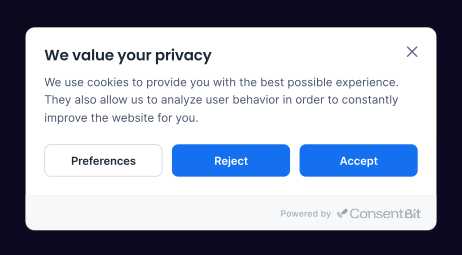
A banner is not consent
A banner announces cookies. Consent means nothing non-essential runs until the shopper agrees, and that you can show what they agreed to.
On a Magento store the stakes run both ways. Fire your pixels before consent and you have a compliance problem. Block them clumsily and your ad measurement disappears. The answer is neither: block until consent, then pass the shopper’s choice to your ad platforms.
What Magento gives you, and what it leaves to you
Cookie Restriction Mode behaviour confirmed against Adobe's Cookie law compliance documentation, checked 23 November 2026.
Three ways Magento stores handle this
Magento merchants usually choose between two kinds of extension and a consent platform, and they solve different problems. This is the honest split.
Checked on 23 November 2026 against the Aheadworks GDPR for Magento 2 and Amasty Cookie Consent (GDPR) for Magento 2 product pages. Where a vendor's page does not state a capability, we show it as not listed rather than claiming it is missing.
Most stores need two of these three. A data rights extension handles deletion and export requests inside Magento, which we do not do. For what loads in the browser, Amasty's cookie extension is a genuine option. Where we differ is that we find your cookies for you instead of asking you to list them, we are a Google-certified CMP, and we carry IAB TCF. Amasty say on their own page that they are "currently exploring the demand" for a Magento CMP with TCF and Google certification.
Four questions that decide it
How to add cookie consent to a Magento store
Scan your store
Add your domain and ConsentBit returns every cookie and tracker found, including the ones your extensions brought with them.
Add the script
In the Magento admin, go to Content → Design → Configuration, edit your store view, open HTML Head → Scripts and Style Sheets, paste the ConsentBit script and save.
Set your rules and publish
Choose your categories, style the banner to match your store, set your regions, then flush the cache. Non-essential scripts stay silent until a shopper agrees.
Then turn off Cookie Restriction Mode, so shoppers are not asked twice.
How to check your store actually blocks cookies
Two minutes.
Illustration of the test result. Cookie names are the examples from step 3.
Found pixels firing early?
Run a free scan and see every tracker on your store in under a minute.
What you get with ConsentBit
Your ad measurement survives a Reject. Consent Mode v2 keeps signals flowing to Google instead of going dark.
Proof, not promises. Every consent is logged with its timestamp and choices, and exports as CSV or JSON.
- Free · 1 domain, 5,000 pageviews
- Basic $9
- Essential $20
- Growth $56 per domain, per month
Annual billing saves 12.5% to 33%. 14 day trial, no card required.
ConsentBit for Magento at a glance
Built for how Magento stores run
Stores running paid media.
The more pixels, the more exposure, and the more you need consent signals rather than silence after a decline.
Multi-storefront and multi-brand setups.
Each storefront gets its own banner and settings from one dashboard.
Agencies and system integrators.
One tool across every client, on Magento and everywhere else they build, with volume pricing from five domains.
Four mistakes we see on Magento stores
Cookie Restriction Mode treated as consent.
It was built for a notice requirement, not a consent requirement.
Pixels hardcoded into the theme.
They fire on load, whatever the notice says.
A GDPR extension assumed to cover cookies.
Most handle customer data rights, not what loads in the browser.
The cookie list from launch.
Six extensions later, it describes a store that no longer exists.
Frequently asked questions
Partly. Magento includes Cookie Restriction Mode and some privacy tooling, and Adobe documents what the platform does and does not cover. It has no consent categories, no script blocking and no consent records.
On its own, no. It shows a notice and records an acceptance. Modern consent rules expect categories, a reject that is as easy as accept, blocking before consent and a record you can produce.
If you need customer data deletion, export or anonymisation inside Magento, yes. ConsentBit covers cookie consent and tracking in the browser. The two sit alongside each other.
Paste the ConsentBit script into Content, Design, Configuration, then HTML Head, Scripts and Style Sheets. Save, flush the cache, and turn Cookie Restriction Mode off.
Yes. ConsentBit runs as a script, so there is no module to keep compatible through upgrades.
Yes. Pixels stay blocked until the shopper agrees, and Google Consent Mode v2 is included on every plan.
Plans start at $9 a month per domain for Basic. Essential is $20 and Growth is $56, with annual billing saving between 12.5% and 33%.
Yes. One domain, 5,000 pageviews a month, with GDPR and CCPA coverage, automatic script blocking and Google Consent Mode v2 included.
Yes. Each gets its own banner and settings, managed from one dashboard, with volume discounts from 30% off at five domains.
Yes. Consent records export as CSV or JSON, with timestamps and the exact choices made.
Scan. Block. Prove.
Consent, Done Better.
Know what your store sets, and when.