




Subscribe to ConsentBit Newsletter
Google Consent Mode v2 Explained: What It Is & Why It's Required (2026)

15
July
2026
30
July
2026
.jpg)
TL;DR
- Google Consent Mode v2 helps websites tell Google whether visitors allow or reject different types of tracking.
- It helps Google Ads and Google Analytics work properly while respecting user privacy choices.
- Consent Mode v2 uses four main consent signals to control advertising and analytics data.
- The two new signals in v2 are related to advertising data and personalized ads.
- Businesses using Google Ads or Google Analytics with visitors from Europe and the UK need to understand Consent Mode v2.
- Consent Mode v2 has two options: Basic Mode for more privacy and Advanced Mode for better measurement.
- Proper setup is important because incorrect consent signals can affect advertising performance and website tracking.
What Is Google Consent Mode v2?
Google Consent Mode v2 is a system that helps websites communicate user consent choices to Google services like Google Ads and Google Analytics. In simple words, it tells Google whether a visitor has allowed or refused the use of certain cookies and data collection methods.
When someone visits a website, they usually see a cookie banner asking whether they accept cookies. These choices are important because many websites use cookies for measuring visitors, showing relevant advertisements, and understanding customer behavior. Consent Mode v2 helps connect the user's choice with Google's tools so that these tools can adjust their behavior.
Before Consent Mode v2, Google Consent Mode already helped websites manage user privacy choices. The updated version added two more consent signals related to advertising activities. These new signals help businesses manage how Google uses data for advertising and personalized experiences.
The main purpose of Google Consent Mode v2 is to allow businesses to continue using Google advertising and measurement tools while respecting privacy rules. It does not replace a cookie banner or consent management platform. Instead, it works together with these tools to send the user's choices correctly.
For businesses running Google Ads, Google Analytics 4, or other Google marketing tools, understanding what is Consent Mode v2 is becoming important. Without proper setup, companies may lose useful advertising features and accurate measurement information.
Why Was Consent Mode v2 Introduced?
The internet has changed significantly in recent years. People are becoming more aware of how websites collect and use their information. Governments and privacy organizations have introduced stronger rules to give users more control over their personal data.
Many users now expect websites to ask for permission before collecting information through cookies and tracking technologies. Companies that operate in regions like the European Economic Area (EEA) and the United Kingdom need to follow these privacy expectations when collecting user information.
Google introduced Consent Mode v2 to help businesses handle these changes while continuing to use Google advertising services. The system allows websites to send privacy choices to Google instead of simply collecting data without considering user decisions.
For example, if a visitor rejects advertising cookies, Google can understand that choice and adjust how advertising data is handled. If a visitor accepts cookies, Google services can use the allowed information according to the user's permission.
The main idea is simple: websites can continue measuring and improving their marketing activities while giving users more control over their information.
Who Needs Google Consent Mode v2?
Google Consent Mode v2 is mainly important for businesses that use Google advertising and analytics tools while receiving visitors from regions where consent rules apply. Companies should pay attention to Consent Mode v2 if they use:
- Google Ads for advertising campaigns
- Google Analytics 4 (GA4) for website tracking
- Remarketing campaigns
- Conversion tracking
- Audience-based advertising features
For example, an online store running Google Ads may use tracking data to understand which advertisements bring customers. A service company may use Google Analytics to understand how visitors move through its website. Without proper consent management, these tools may not work as expected for users who do not provide permission.
Businesses that only have a simple website without advertising or analytics tools may not need the same level of setup. However, any company using Google marketing tools should understand how consent affects their data collection.
Consent Mode v2: Basic vs Advanced at a Glance
Google Consent Mode v2 provides two main setup options: Basic Mode and Advanced Mode. Both options respect user choices, but they handle data collection differently.

Basic and Advanced modes are not about choosing between privacy and no privacy. Both are designed to respect user choices. The difference is mainly about how much information Google receives before a user provides consent.
Basic Consent Mode Explained
In Basic Consent Mode, Google tags do not load until the user gives permission. If a visitor rejects cookies or does not provide consent, tracking tools remain blocked. This approach gives users a higher level of control because no data is sent before permission is given.
Many businesses choose Basic Mode because it is easier to understand and provides a simple privacy approach. It is suitable for companies that want to collect information only after receiving clear user approval.
However, one limitation is that businesses may receive less measurement information. When users reject cookies, Google has less information available for understanding conversions and visitor behavior. For companies that depend heavily on advertising data, this may reduce visibility into campaign performance.
Advanced Consent Mode Explained
Advanced Consent Mode works differently. Google tags can load before consent, but they operate in a limited way when users have not given permission. Instead of storing traditional cookies, Google can receive privacy-friendly signals that help estimate campaign performance through modeling.
This allows businesses to understand advertising results better while still respecting user choices. However, Advanced Mode requires careful implementation. The consent signals must be correctly configured, and website scripts must follow the user's decision immediately. A wrong setup can create privacy issues and inaccurate tracking results. Businesses choosing Advanced Mode should ensure that their consent management system is properly connected with Google tools.
The 4 Consent Signals in Google Consent Mode v2
Google Consent Mode v2 works through four main consent signals. These signals help Google understand what type of permission a visitor has given or rejected. Each signal controls a different type of data use, especially related to advertising and website measurement.
Understanding these signals is important because a website does not collect all data for the same purpose. Some information is used to understand website performance, while other information is used for advertising and showing more relevant content.
The four signals are ad_storage, analytics_storage, ad_user_data, and ad_personalization. The first two signals existed in the earlier version of Consent Mode, while the last two were added in Consent Mode v2.
1. ad_storage: Advertising Cookies and Data
The ad_storage signal controls whether advertising-related cookies can be stored on a visitor's device. These cookies are commonly used by tools like Google Ads to measure advertising performance and understand whether an advertisement leads to a sale or action.
For example, when a person clicks a Google advertisement and later purchases something from a website, advertising cookies help connect that activity. This information helps businesses understand which campaigns are working.
If a user accepts advertising cookies, the website can allow Google Ads-related tracking according to the user's permission. If the user rejects advertising cookies, the website should prevent those cookies from being stored. This signal is important for businesses that depend on online advertising because it affects how accurately they can measure their campaigns.
2. analytics_storage: Website Measurement Data
The analytics_storage signal controls cookies used for website analytics. These cookies help tools like Google Analytics understand how visitors use a website.
For example, analytics data can show:
- How many people visited a website
- Which pages visitors viewed
- How long people stayed on a page
- Which pages helped users complete an action
This information helps businesses improve their websites and understand visitor behavior. When a user accepts analytics cookies, Google Analytics can collect information based on that permission. When the user rejects them, analytics tracking should be limited according to the consent choice. Without proper analytics consent management, businesses may not get accurate information about website performance.
3. ad_user_data: User Data for Advertising
The ad_user_data signal is one of the new additions introduced with Google Consent Mode v2. It controls whether user-related data can be sent to Google for advertising purposes. This signal is important because modern advertising systems use different types of information to measure campaigns and improve advertising results.
For example, businesses may use customer information to understand conversions or improve advertising performance. However, this type of data use requires proper user permission. The purpose of this signal is to make sure advertising-related data sharing happens only according to the user's consent choice. Businesses using Google advertising features need to correctly manage this signal because it affects how Google Ads features work for users in regions with strict privacy requirements.
4. ad_personalization: Personalized Advertising
The ad_personalization signal controls whether Google can use information to create personalized advertising experiences. Personalized ads are advertisements based on user interests, previous interactions, or browsing behavior. For example, someone who visits a website about running shoes may later see advertisements related to sports products. This type of advertising uses user information to make advertisements more relevant.
If a visitor does not allow personalized advertising, businesses should not use their information for this purpose. This signal gives users more control over whether they want personalized advertising experiences.
Why Is Google Consent Mode v2 Required?
Many businesses ask, "Is Consent Mode v2 required?" The answer depends on how the business uses Google tools and where its website visitors are located. For companies using Google Ads and Google Analytics with users from the European Economic Area (EEA) and the United Kingdom, Consent Mode v2 has become an important requirement for maintaining certain advertising and measurement features.
The main reason is privacy. European privacy rules require businesses to give users more control over how their personal information is collected and used. Google has introduced Consent Mode v2 to help businesses follow these requirements while still allowing them to use advertising and analytics tools.
What Happens If You Do Not Set Up Consent Mode v2?
A website without proper Consent Mode v2 setup may face problems with Google advertising and measurement features. The biggest issue is reduced visibility into marketing performance. For example, a company running Google Ads may not be able to fully understand which advertisements are generating customers. Conversion tracking may become incomplete, and audience features may become limited.
Businesses may also lose access to some advertising features that depend on user consent information. This does not mean Google Ads will completely stop working. However, the quality of measurement and advertising optimization can be affected. For companies investing money in online advertising, accurate measurement is important because it helps them make better decisions.
Why Google Requires Consent Signals
Google needs consent signals because not every website visitor gives the same permission. One visitor may accept advertising cookies, while another visitor may reject them. Google needs to understand these choices so its tools can respond correctly.
Without consent signals, Google services cannot know whether data collection is allowed or restricted. Consent Mode v2 creates a communication system between:
- The website
- The user's consent choice
- Google advertising and analytics tools
This helps businesses respect user decisions while continuing to use measurement features where permission allows.
Basic vs Advanced Consent Mode: Which One Should You Choose?
Choosing between Basic and Advanced Consent Mode depends on the business goal, privacy approach, and how important measurement data is.
- When Basic Consent Mode Makes Sense
Basic Mode is suitable for businesses that want the strongest privacy approach. In this setup, Google tags wait until the user provides consent. If the visitor rejects cookies, tracking does not begin. This option is easier to manage and understand. It works well for businesses that prefer collecting less data and giving users maximum control. However, businesses may lose some information about advertising performance because rejected users do not provide measurement signals.
- When Advanced Consent Mode Makes Sense
Advanced Mode is useful for businesses that need better measurement while still respecting user choices. In this setup, Google tags can send limited signals before consent. These signals do not work like traditional cookies but help Google improve measurement through modeling.
This can help businesses understand advertising results more accurately, especially when many visitors reject cookies. However, Advanced Mode needs careful implementation. Incorrect settings can create tracking problems and privacy concerns. Businesses should select Advanced Mode only when they have proper technical support and testing.
Why Many Consent Mode v2 Setups Fail
A correct Consent Mode v2 setup requires more than adding a cookie banner. Many websites fail because the connection between the consent banner, website scripts, and Google tools is not properly configured. Common mistakes include:
- Loading Tracking Before User Consent
One common mistake is allowing marketing scripts to run before the visitor makes a choice. If advertising or analytics cookies load before consent, the website may not respect the user's decision.
- Missing Consent Signals
Some websites configure only basic signals and forget the new Consent Mode v2 signals. All four signals need to be passed correctly:
- ad_storage
- analytics_storage
- ad_user_data
- ad_personalization
Missing signals can affect how Google understands user consent.
- Poor Cookie Banner Integration
A cookie banner alone does not create Consent Mode v2. The consent management platform needs to communicate properly with Google tools. If the banner collects user choices but does not send those choices correctly, the setup will not work properly.
- Not Testing After Setup
Many businesses install Consent Mode v2 and assume everything is working. Testing is important because small mistakes can affect tracking. Tools like Google Tag Assistant and Tag Debugger can help confirm whether consent signals are being sent correctly.
How to Set Up Google Consent Mode v2 Correctly
Setting up Google Consent Mode v2 correctly requires more than adding a cookie banner to a website. The banner is only the first step. The website must also send the user's consent choices to Google tools at the correct time.
A proper setup makes sure that tracking scripts follow the user's decision. If a visitor accepts cookies, the allowed tracking can work. If a visitor rejects cookies, the website should respect that choice and limit data collection. Businesses should also test the setup after implementation. A small mistake in configuration can affect advertising reports, analytics data, and privacy compliance. The following checklist helps businesses review their Consent Mode v2 setup:
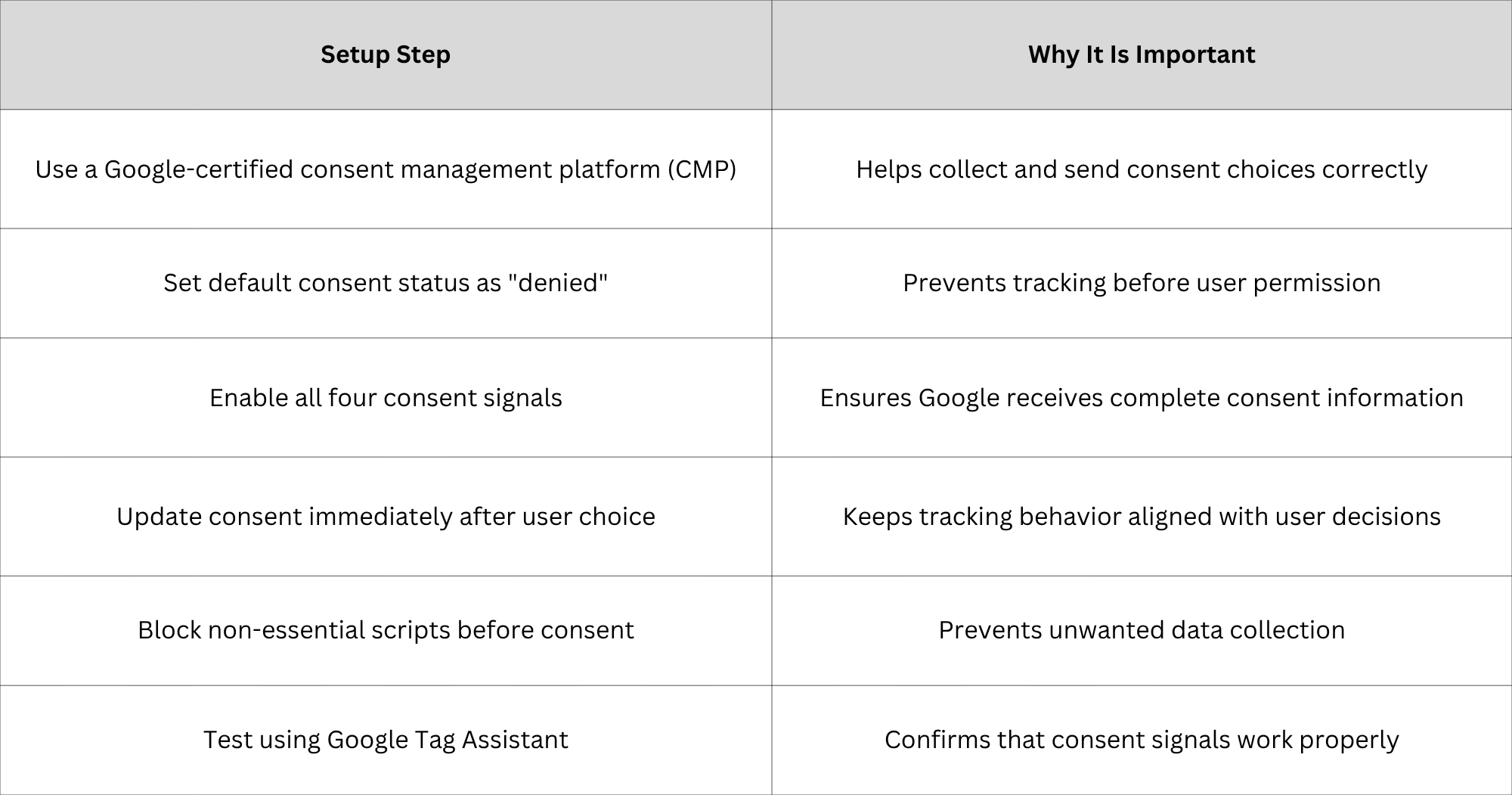
A correct setup creates a better balance between user privacy and business measurement needs.
Does Consent Mode v2 Replace a Cookie Banner?
No, Google Consent Mode v2 does not replace a cookie banner. Many people misunderstand this point. Consent Mode v2 and a cookie banner have different roles. A cookie banner is the part users see when they visit a website. It allows visitors to choose whether they accept or reject different types of cookies.
Consent Mode v2 works behind the scenes. It takes those user choices and communicates them to Google services. For example, when a visitor clicks "Reject Advertising Cookies" on a cookie banner, Consent Mode v2 sends that information to Google Ads. Google can then adjust how advertising data is handled. Both parts are needed:
- The cookie banner collects user permission.
- Consent Mode v2 sends that permission to Google tools.
A website using only a cookie banner may collect consent choices but fail to communicate them properly to Google.
How to Check If Google Consent Mode v2 Is Working
After completing the setup, businesses should confirm that Consent Mode v2 is working correctly. Testing helps identify problems such as:
- Google tags loading before consent
- Missing consent signals
- Incorrect cookie settings
- Consent updates not being sent
One simple way to check is by using Google Tag Assistant. This tool helps website owners see whether Google tags are receiving the correct consent information.
Businesses should test different situations:
- A visitor accepts all cookies.
- A visitor rejects all cookies.
- A visitor changes their choice later.
- A visitor visits the website for the first time.
The website should respond correctly in each situation. Testing is an important step because a website may appear normal while tracking is not working correctly in the background.
Conclusion
Privacy and digital marketing now need to work together. Businesses still need website data to understand customers, improve campaigns, and make better decisions. At the same time, users want more control over how their information is collected and used. Google Consent Mode v2 helps create a connection between these two needs. It allows businesses to respect user choices while continuing to use Google advertising and analytics tools in a responsible way.
However, Consent Mode v2 only works properly when it is set up correctly. A simple cookie banner is not enough. The website needs correct consent signals, proper script control, and regular testing. ConsentBit helps businesses create a Consent Mode v2-ready setup by managing user choices, passing the required consent signals, and helping prevent tracking scripts from running before permission is given. A correct setup protects user privacy and helps businesses maintain better-quality marketing data.
Frequently Asked Questions
1. Is Google Consent Mode v2 mandatory?
Google Consent Mode v2 is required for businesses that want to continue using certain Google advertising and measurement features for users in regions such as the European Economic Area (EEA) and the United Kingdom. Businesses using Google Ads, remarketing, audience features, or conversion measurement should make sure their setup supports Consent Mode v2. The exact requirement depends on the tools being used and the location of website visitors.
2. What happens if I do not set up Consent Mode v2?
Without proper Consent Mode v2 setup, businesses may lose important advertising and measurement capabilities for users who do not provide consent. For example, Google Ads may have less information for conversion tracking, remarketing audiences may be affected, and campaign reports may become less accurate. The website may still work normally for visitors, but the business may have less visibility into marketing performance.
3. Consent Mode v2 Basic vs Advanced: Which one should I choose?
The choice depends on the business's privacy needs and measurement requirements. Basic Consent Mode provides a simpler approach where Google tags wait until users provide consent. It gives stronger privacy control but provides less measurement information. Advanced Consent Mode allows limited signals before consent and uses modeling to improve measurement. It can provide better insights but requires more careful setup. Businesses should choose based on their advertising needs, website traffic, and privacy approach.
4. Does Consent Mode v2 replace a cookie banner?
No. Consent Mode v2 and cookie banners work together. A cookie banner collects the user's choice, while Consent Mode v2 sends that choice to Google services. A business still needs a proper consent management solution to collect user permissions.
5. How do I know if Consent Mode v2 is working?
Businesses can check Consent Mode v2 using tools like Google Tag Assistant and other tag testing tools. A proper setup should show that consent signals are being sent correctly and that tracking behavior changes based on the user's choice. Testing different consent scenarios is the best way to confirm that everything works properly.