

Framer Cookie Consent: Built Into the Canvas, Not Bolted On
Framer gives you a beautiful site and a custom code field. Neither of them asks your visitors for permission, and neither stops the analytics script you pasted from firing on load.
ConsentBit is a Google-certified CMP with a native Framer plugin. Install it from the Marketplace, design the banner on the canvas, publish.
Inside the canvas, not beside it.
Consent, Done Better.
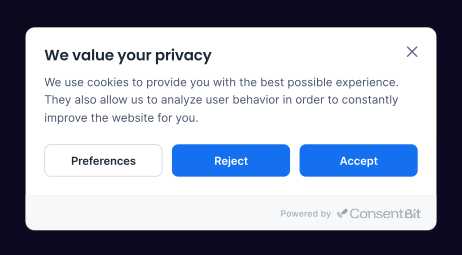
A banner is not consent
A banner announces cookies. Consent means nothing non-essential runs until the visitor agrees.
On Framer the gap opens in the custom code field. Google Analytics goes in, a Meta Pixel goes in, a Calendly embed goes into a page, and all of them run the moment the page loads. A banner component placed on the canvas has no way to hold them back.
What Framer gives you, and what it leaves to you
Framer is a design tool doing design brilliantly. Consent is a different job.
Your options on Framer
A free component gives you the look. It cannot give you the blocking, and blocking is the part the law is about.
Four questions that decide it
How to add cookie consent to a Framer site
Scan your site
Add your domain and ConsentBit returns every cookie and tracker found, including the ones your embeds brought with them.
Install the plugin
Open the ConsentBit plugin from the Framer Marketplace, design the banner on the canvas, and publish it from there.
Publish your site
The banner goes live with your next publish. Non-essential scripts stay silent until someone agrees.
Inside the canvas, not beside it. Most Framer users are done in under five minutes.
How to check your Framer site actually blocks cookies
Two minutes.
Illustration of the test result. Cookie names are the examples from step 3.
Found cookies firing early?
Run a free scan and see every tracker on your site in under a minute.
What you get with ConsentBit
Consent that feels like the site.
Full design control on every paid plan, matched to your work rather than bolted onto it.
Proof, not promises.
Every consent is logged with its timestamp and choices, and exports as CSV or JSON.
- Free · 1 domain, 5,000 pageviews
- Basic $9
- Essential $20
- Growth $56 per domain, per month
Annual billing saves 12.5% to 33%. 14 day trial, no card required.
ConsentBit for Framer at a glance
Built for how Framer work happens
Designers and studios.
Every client site on one dashboard, and on Growth the banner carries their brand instead of ours.
Freelancers shipping fast.
Install, style, publish. No script wrangling, no separate account per client.
Teams running ads.
Consent Mode v2 keeps measurement alive after a decline instead of going dark.
Four mistakes we see on Framer sites
The banner component that blocks nothing.
It looks right on the canvas and fails the test on the live site.
Scripts in the custom code field.
They fire on load, whatever the banner says.
Reject hidden behind Preferences
Refusing has to be as easy as accepting, on the first screen.
The cookie list from launch day.
Embeds were added since, and the policy never caught up.
Frequently asked questions
No. Framer gives you design control and custom code fields, but no consent logic, no script blocking and no consent records. Those come from a consent tool.
On its own, usually not. A component shows a message and stores a click. GDPR asks that non-essential scripts stay blocked until the visitor agrees, which a design component cannot do.
Install the ConsentBit plugin from the Framer Marketplace, design your banner on the canvas, then publish your site. Most people are done in under five minutes.
Yes. Scripts added there are blocked until the visitor consents, then released based on their choices.
Yes. Google Consent Mode v2 is included on every plan, so your Google tags receive the visitor’s choices.
Plans start at $9 a month per domain for Basic. Essential is $20 and Growth is $56, with annual billing saving between 12.5% and 33%.
Yes. One domain, 5,000 pageviews a month, with GDPR and CCPA coverage, automatic script blocking and Google Consent Mode v2 included.
Yes. Agencies manage every client site from one dashboard and can assign Basic, Essential or Growth per site, with volume discounts from 30% off at five domains.
Framer, Webflow, WordPress, Shopify, Squarespace, Wix, Magento, Drupal, Joomla, plain HTML and any site where you can add a script. Framer and Webflow have native apps.
Yes. Consent records export as CSV or JSON, with timestamps and the exact choices made.
Scan. Block. Prove.
Consent, Done Better.
Install the plugin, publish your site, and nothing tracks before it should.