

Cookie Banner Code: What the Free Scripts Do, and Where They Stop
You can put a cookie banner on any site in twenty minutes with an open-source library. It will render, store a choice, and cost nothing. For a personal site, that is a reasonable answer.
What it will not do is tell you which trackers your site actually sets, keep a record you can hand to a regulator, or send consent signals to Google so your ad measurement survives a decline.
ConsentBit is a Google-certified CMP that runs on any site from a single script, custom-coded, headless or no-code.
Consent, Done Better.
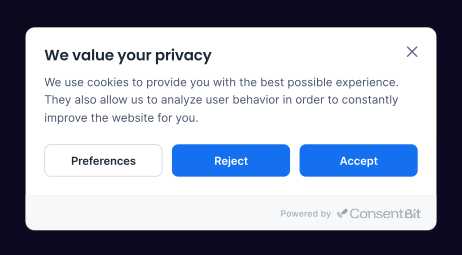
A banner is not consent
A banner announces cookies. Consent means nothing non-essential runs until the visitor agrees, and that you can show what they agreed to.
Writing the banner is the easy part. The hard parts are knowing what is on your site, holding it back until the answer arrives, telling your tags what the answer was, and keeping the record.
Free library or a CMP
The honest summary: a free library saves money and costs maintenance. A CMP costs money and saves maintenance. If your site is simple and you enjoy owning the implementation, the library is fine.
Four questions that decide it
How to add cookie consent to any site
Scan your site
Add your domain and ConsentBit returns every cookie and tracker found, including the ones from embeds and third-party widgets.
Add one script
Paste the ConsentBit script before the closing </head> tag, wherever your site renders its head: a static HTML file, a template, a layout component, or a no-code builder’s custom code field.
Set your rules and publish
Choose your categories, style the banner, set your regions, publish. Non-essential scripts stay silent until consent.
For single-page apps and headless front ends, the banner persists across route changes without re-initialising, and the consent API lets you gate your own scripts on the visitor’s choice.
How to check your site actually blocks cookies
Two minutes.
Illustration of the test result. Cookie names are the examples from step 3.
Not sure what your site sets?
Run a free scan and see every tracker in under a minute.
What you get with ConsentBit
Proof, not promises.
Every consent is logged with its timestamp and choices, and exports as CSV or JSON.
- Free · 1 domain, 5,000 pageviews
- Basic $9
- Essential $20
- Growth $56 per domain, per month
Annual billing saves 12.5% to 33%. 14 day trial, no card required.
ConsentBit for custom sites at a glance
Who this fits
Developers on custom builds.
One script instead of an implementation you maintain, plus a consent API for gating your own code.
Headless and SPA front ends.
Consent that survives client-side routing, which is where most home-rolled banners fall over.
No-code builders.
Bubble, Softr, Framer, Webflow and anything else with a custom code field. If you can paste a script, you can run a certified CMP.
Agencies.
One account across every client build, whatever it was made in.
Four mistakes we see on custom sites
The banner that only hides cookies.
It renders, it stores a click, and the analytics script in the head already ran.
Consent stored, never acted on.
The choice sits in localStorage and no script ever reads it.
Consent lost on route change.
The SPA re-initialises and the visitor is asked again, or worse, tracked anyway.
No record.
A choice in the browser is not evidence. An export with timestamps is.
Frequently asked questions
Yes, and plenty of free libraries do it well. The banner is the straightforward part. Scanning for trackers, blocking them before consent, signalling Google and keeping exportable records are the parts you would be building and maintaining yourself.
Not by itself. Compliance depends on non-essential scripts staying blocked until consent, a genuine reject option and a record you can produce. A banner library gives you the first interface, not the rest.
Paste the ConsentBit script before the closing head tag, set your cookie categories and publish. It works the same on a static site, a template or a component layout.
Yes. The script loads in the head of your rendered page, and the banner persists across client-side route changes.
Yes. The script goes into your front end, so it does not matter which CMS supplies the content.
Yes. The consent API lets your code check the visitor’s choice before running.
Plans start at $9 a month per domain for Basic. Essential is $20 and Growth is $56, with annual billing saving between 12.5% and 33%.
Yes. One domain, 5,000 pageviews a month, with GDPR and CCPA coverage, automatic script blocking and Google Consent Mode v2 included.
Yes. Consent records export as CSV or JSON, with timestamps and the exact choices made.
Scan. Block. Prove.
Consent, Done Better.
If you can paste a script, you can run a certified CMP.