




Subscribe to ConsentBit Newsletter
Cookie
What Is a Session Cookie? Everything You Need to Know in 2026

15
May
2026
31
July
2026

TL;DR
1. A session cookie stores temporary website data during a user's browsing session.
2. It helps websites remember actions like logins, shopping carts, and form entries.
3. Session cookies usually expire when the browser is closed.
4. Essential session cookies may not require GDPR consent.
5. Analytics or tracking-related session cookies may still require consent.
6. Persistent cookies remain after sessions end; session cookies do not.
7. Session cookies improve usability, authentication, and security.
8. Businesses should still disclose session cookies in privacy and cookie policies.
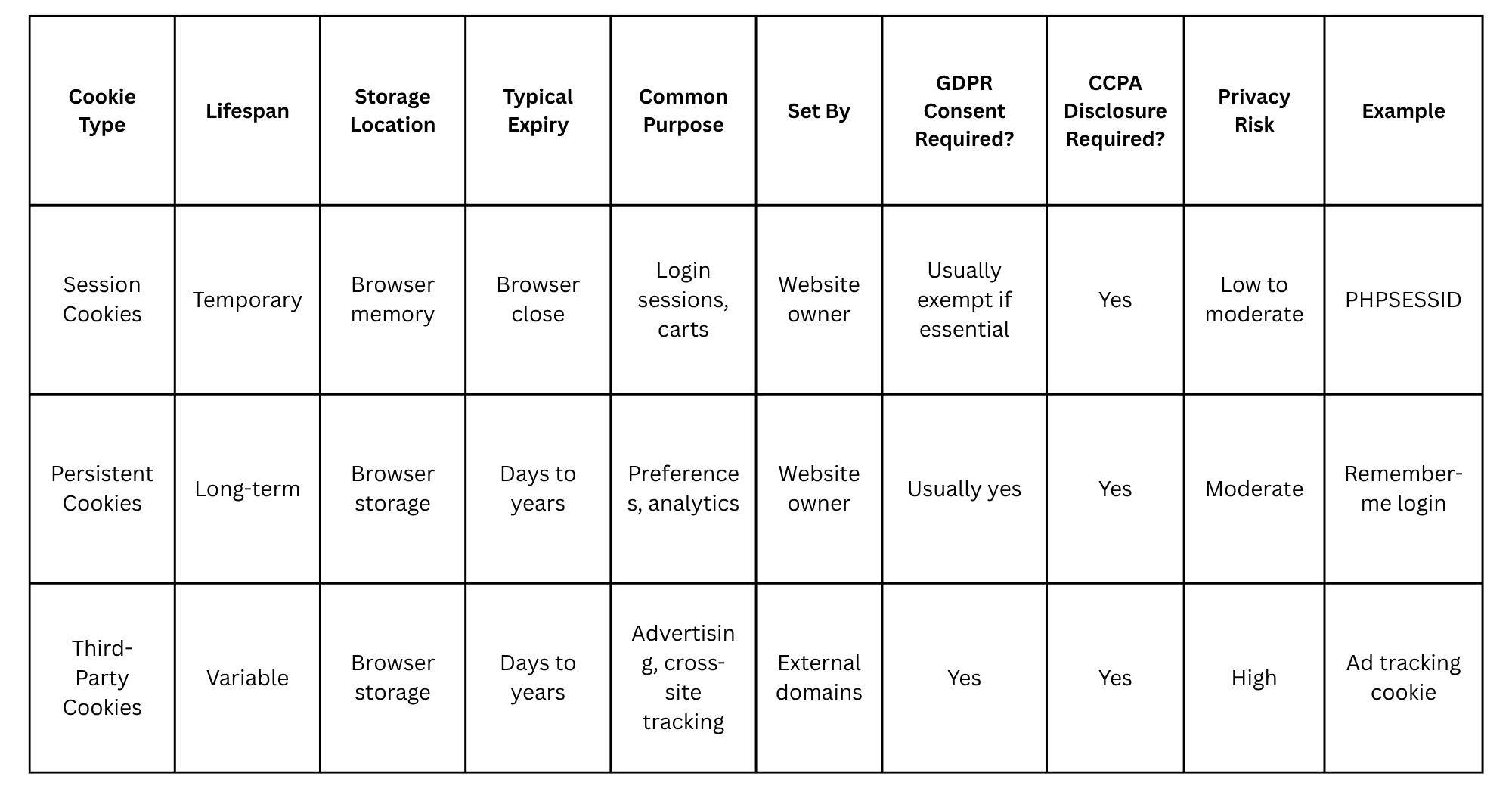
Session Cookies vs Persistent Cookies vs Third-Party Cookies: At-a-Glance
Cookies serve different purposes depending on how long they last, who sets them, and how they process user data. Understanding these differences is essential for developers, website owners, and privacy compliance teams.
Why Session Cookies Matter for Your Website
Session cookies are one of the basic building blocks of modern websites. Most interactive sites need them to track temporary data between pages visited by a user. Without session cookies, websites would not be able to offer user authentication, shopping carts, multi-page forms, and other functions.
While the underlying technology itself is relatively simple, session cookies require careful analysis because of their connections to usability, security, and privacy. On the one hand, developers can use them to provide better user experience. On the other hand, authorities examine how they collect personal data under regulations like the GDPR and CCPA.
In an environment where privacy expectations keep changing in 2026, session cookies cannot be ignored by businesses. They will need to find out whether specific types of cookies are absolutely necessary and should be used without explicit consent or require approval from a customer.
Here we take a detailed look at what session cookies are, why they are needed, when you should ask for consent, and how you can handle them responsibly. Let’s dive in.
What Is a Session Cookie?
A session cookie is a temporary cookie that stores data in the user’s browser for the duration of a browsing session. It mainly aims at keeping track of some website information from one page to another in the browsing process. After the session ends, usually on closing of the browser window, the cookie expires.
As such, when a user browses a site, a session identifier is generated for that particular user. The server then generates a session and stores some information about the session temporarily on the server end. On browsing through the site, the user gets the session identifier which is passed each time he sends a request to the website.
In the event of an e-commerce store, if the user puts items into the shopping basket, the website will use a session cookie to identify the basket belonging to that particular session of the user.
An effective comparison that can be made is that of a visiting badge for the purpose of accessing an office building. This visiting badge allows one access during the time one is within the building; however, when one leaves, it automatically becomes void.
Session cookies are different from persistent cookies since they have short lives, lasting only throughout the length of the browsing session.
5 Common Uses of Session Cookies
The following are some common uses of session cookies:
1. Authentication and Login State
The most common use of cookies is that they help in retaining the login status of an authenticated user. After successful authentication, session cookies are created so that there is no need for the user to provide credentials on every request.
This helps to retain account access for users without burdening the servers and creating better user experience.
2. Shopping Cart Management
Session cookies play a very important role in keeping the shopping cart state during browsing of the website. They link the customer with the cart items maintained on the server side.
Without session cookies, maintaining a persistent cart would be difficult or impossible in some cases.
3. Form Data Retention
In many applications and websites, session cookies are used for temporary storage of form input data. This practice is helpful in case of multi-page forms like checkout, sign up or surveys.
When moving back and forth between pages, session cookies can help recover lost form data.
4. Session Security
Session cookies can be used to build up the security system as well since they help in identifying active sessions and any unauthorized accesses to the system.
With proper management of session, the threat of account hijack can be minimized greatly especially when encryption is enabled by using HTTPS.
5. Temporary User Preferences
Session cookies can be used to store temporary user preferences such as language choice, accessibility, and region choices among others.
These preferences improve the browsing experience without requiring permanent tracking or long-term storage.
When Session Cookies Need Permission?
One of the most misunderstood issues concerning session cookies is whether their use necessitates consent based on privacy laws like the GDPR and CCPA.
Cookies considered necessary for specific purposes are usually exempt from obtaining prior consent according to the GDPR and the EU ePrivacy Directive. Some examples include session cookies that:
- Identify and authenticate the user
- Facilitate shopping basket operations
- Carry out security measures
- Perform load balancing
- Provide temporary storage for sessions
For instance, a session cookie that ensures a user remains logged in while browsing a banking site is considered strictly necessary.
The use of other session cookies does not necessarily imply being exempted from needing prior consent. This is based on the use of the cookie rather than its lifetime. Session cookies collecting behavioral data, tracking the user's browsing history, serving advertising purposes, or contributing to profiling should obtain prior consent regardless of having a session lifetime.
It creates confusion on the part of many websites. Certain analytics tools use session-based cookies that actually work like session cookies, but nevertheless, process personal information for measuring or marketing purposes.
As far as the CCPA is concerned, there is no obligation for companies to seek prior cookie consent like in the case of GDPR. Nevertheless, companies will be obligated to inform about cookie use, types of data collected, and options for opting out of their data sharing or selling.
In 2026, it is advisable to categorize session cookies based on necessity rather than longevity. Many privacy-oriented companies undertake cookie audit campaigns to figure out whether the cookies are necessary, functional, analytical, or marketing cookies.
According to ConsentBit, an ambiguity surrounding certain session cookies should be treated carefully. In case such cookies help track analytics or behavioral data in addition to functional purposes, seeking prior consent might prove useful.
Session Cookies vs Persistent Cookies: Which Should You Use?
Session cookies and persistent cookies have different uses in terms of function, and nowadays many sites use both kinds of cookies.
Session cookies are more suitable for functions performed during actual browsing sessions. These include authentication, checking out, verification, and state management. The fact that they automatically expire renders them less dangerous from a privacy perspective.
Persistent cookies are kept even after closing the web browser. These can be used to store user information such as passwords, personalizations, analytics, and ads.
Which kind of cookie you should use really depends on the exact purpose. Temporary functions are better served by session cookies, whereas persistent functions call for persistent cookies.
A good idea might be using session cookies for functions that are necessary, while keeping persistent cookies only for optional ones that users consent to use.
How to Identify Session Cookies on Your Website (3-Step Audit)
Understanding which cookies your website uses is essential for privacy compliance and security management.
Step 1: Open Browser Developer Tools
In Chrome, Edge, or Firefox, open Developer Tools by pressing F12 or right-clicking and selecting “Inspect.”
Navigate to:
Application → Storage → Cookies (Chrome)
This section displays all cookies currently active on the website.
Step 2: Check Cookie Attributes
Review the cookie attributes carefully. Session cookies usually lack an explicit expiration date or “Max-Age” value.
Important attributes include:
- Name
- Domain
- Path
- Expires
- Secure
- HttpOnly
- SameSite
If no expiration is defined, the cookie is typically session-based.
Step 3: Classify Cookies by Purpose
Next, determine what each cookie actually does. Ask:
- Is it essential for site functionality?
- Does it track user behavior?
- Is it connected to analytics or advertising?
- Is it set by your domain or a third party?
This classification is critical for GDPR and CCPA compliance assessments.
Businesses can simplify the process using automated cookie scanning tools. Consent Bit’s free cookie scanner helps identify active cookies, classify their purposes, and detect potential compliance gaps across websites.
Best Practices for Managing Session Cookies
Below are some best practices for managing session cookies:
- Set Appropriate Timeout Values
Avoid excessively long session durations. Shorter timeouts reduce security exposure if devices are left unattended or compromised.
High-risk applications such as banking platforms should implement stricter expiration policies.
- Use Secure and HttpOnly Flags
Always configure session cookies with:
- Secure flag
- HttpOnly flag
- SameSite protections
These settings help mitigate risks such as cross-site scripting (XSS) and session hijacking.
- Regenerate Session IDs After Login
Session fixation attacks can occur when session IDs remain unchanged after authentication.
Regenerating session identifiers after login significantly improves account security.
- Document Cookies in Privacy Policies
Even exempt session cookies should be disclosed transparently in cookie notices and privacy policies.
Clear documentation improves compliance readiness and strengthens user trust.
Conclusion
The session cookie is the cornerstone of contemporary online activity. They help users authenticate, remain secure, shop online, and enjoy a smooth browsing experience. Despite being more benign than other types of cookies in most cases, session cookies’ legal classification depends upon what they do rather than their duration.
From a developer or corporate perspective, knowing how session cookies function will be important when trying to strike a balance between usability, cybersecurity, and legality in 2026. The right classification and disclosure practices can limit legal and operational exposure.
In case you need to analyze and classify cookies for your site, ConsentBit provides a free cookie scanner that helps track down all cookies and assesses necessary consent measures.
Frequently Asked Questions
1 . Do session cookies need consent under GDPR?
No, not necessarily. Session cookies that are strictly necessary for basic functions of a website fall under an exemption from the consent requirement in the context of GDPR and ePrivacy Directive. However, session cookies involved in analytics, marketing, or profiling purposes can still potentially require user consent.
2. Are session cookies safe?
Yes, in general, session cookies pose fewer security threats compared to persistent cookies, as they automatically expire when the browsing session is over. Nevertheless, insecure handling of session cookies by developers can put a website in danger of being attacked through various methods including session hijacking or XSS attacks.
3. What’s the difference between session cookies and persistent cookies?
Session cookies are temporary, and are automatically removed once the session ends. Persistent cookies, on the other hand, are retained for a certain period following the end of a session. While session cookies facilitate temporary site functionality, persistent cookies are frequently employed for storing preferences, conducting analytics, or achieving personalization over time.
4. Can session cookies track users across websites?
Typically, session cookies do not follow users on different sites since they are primarily first party and only exist temporarily. Third-party companies could potentially implement session cookies for cross-site tracking or analyzing browsing behavior, especially when there is embedding of ads and tracking scripts.
5. How long does a session cookie last?
A session cookie is meant to expire after a session ends. This normally means that session cookies will be deleted upon closure of the browser tab or browser. Some web browsers have an option to resume sessions even after a crash or browser relaunch.